How it works
One TV. Everyone’s phone. Zero controllers.
The TV hosts the game and shows the board. Each phone becomes a private controller. Pick the way that suits your screens.
With the appsRecommended
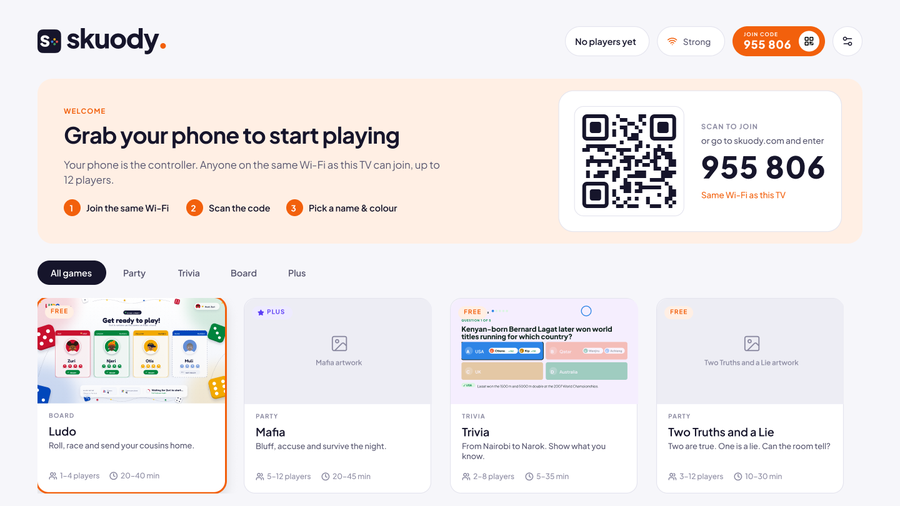
1. Open the Skuody TV app
A join code and QR code appear on screen.
2. Open the Skuody app on your phone
Nearby TVs show up. Tap yours to join, or scan the code.
3. Pick a name and avatar
You’re in the room. The host starts the game.
4. Play
Tap, swipe and shake. Your phone vibrates when it’s your turn.
In the browser
1. Go to skuody.com/tv on the big screen
Any smart TV browser, laptop or tablet. Sign in with your phone, then go full screen.
2. Scan the code with your phone camera
It opens your room in the phone browser. Or type the code at skuody.com/join.
3. Pick a name and avatar
Sign-in is optional for free games.
4. Play
Same games. Keep the tab open while you play.




If something isn’t working
Can’t find the TV?
Check that your phone is on the same Wi-Fi as the TV, not mobile data.
Browser keeps disconnecting?
Keep the tab open and the screen awake. The app avoids this.
Lag on the TV?
Use the Skuody TV app instead of the TV’s browser for smoother play.
Game night starts in 30 seconds.
Get Skuody on your TV and bring everyone into the room.
Get Skuody free